AREX Express Booking: Incheon Airport to Seoul Step by Step

What This Walkthrough Covers — and Where It Stops
Every screen below comes from the official AREX booking site, airportrailroad.com, viewed on a phone and captured on 2026-10-01; the Incheon Airport English site airport.kr was checked the same day. This AREX Express booking walkthrough from Incheon Airport to Seoul runs language setting → departure station → arrival station → train list, and stops at the Reserve button, because the next step is login and card payment. The results cards show T1 → Seoul Station in 43 minutes.
| Item | What the official screens show (2026-10-01) |
|---|---|
| Weekday first Express | T2 05:16 · T1 05:24 → Seoul Station 06:07 |
| Weekday last Express | T1 22:48 → Seoul Station 23:31 |
| Journey time | 43 min (T1 → Seoul Station) |
| Booking window | Up to 60 days ahead, closes 20 min before departure |
| Group size | 12 people max, adults and children combined |
| Express fare | Not confirmed — link was broken that day |
Weekend and holiday Express timetables are published separately. The All-Stop train sits on its own tab of the same screen and uses transit-card fares rather than seat reservations.
Step 1. Switch the Site to English Before Anything Else
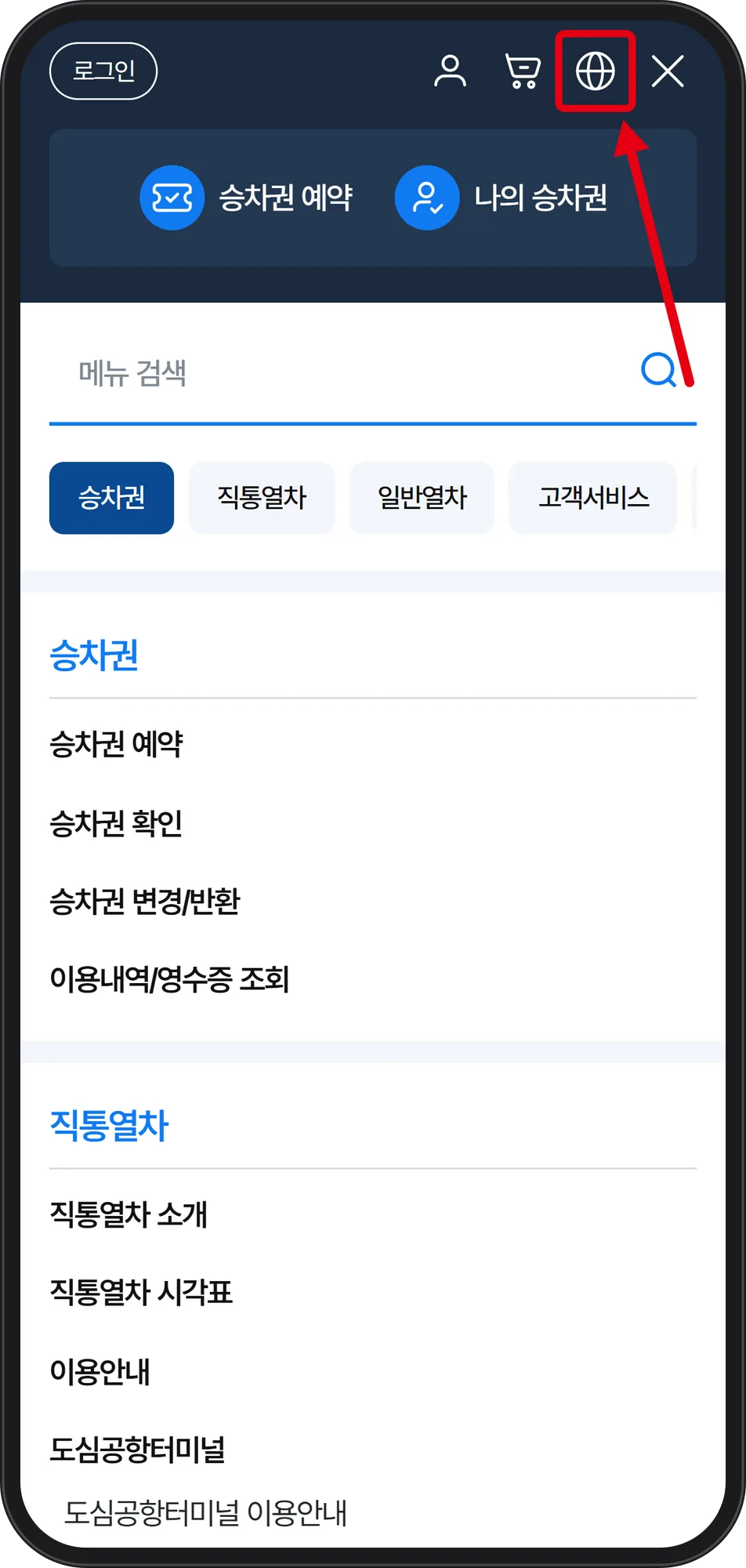
The first screen loads in Korean. Open the ☰ menu and look at the icon row at the top right: person, cart, globe, X. The third icon, the globe, is the language setting.
 Source: AREX official booking site airportrailroad.com (captured Oct 1, 2026)
The red box marks the globe icon inside the full mobile menu, above the list reading 승차권 (tickets), 직통열차 (Express Train) and 일반열차 (All-Stop Train).
 Source: AREX official booking site airportrailroad.com (captured Oct 1, 2026)
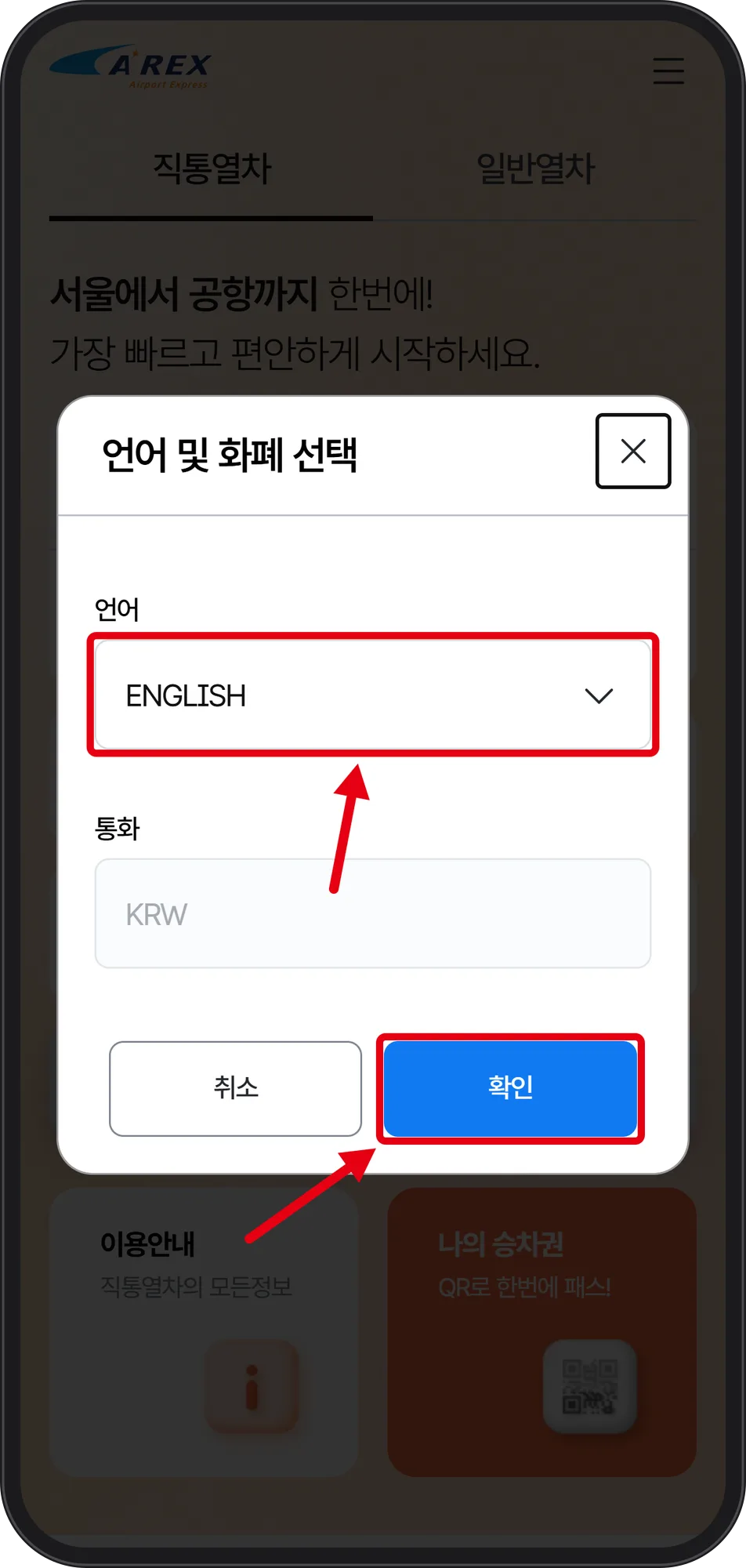
The popup titled 「언어 및 화폐 선택」 is the language and currency selector. Set 언어 (language) to ENGLISH; 통화 (currency) stays greyed out at KRW. The popup itself remains in Korean even after you pick English — the blue button 「확인」 means confirm, the white 「취소」 means cancel. The two sit side by side, so check the color before you tap.
Step 2. Pick Your Terminal, Then Seoul Station
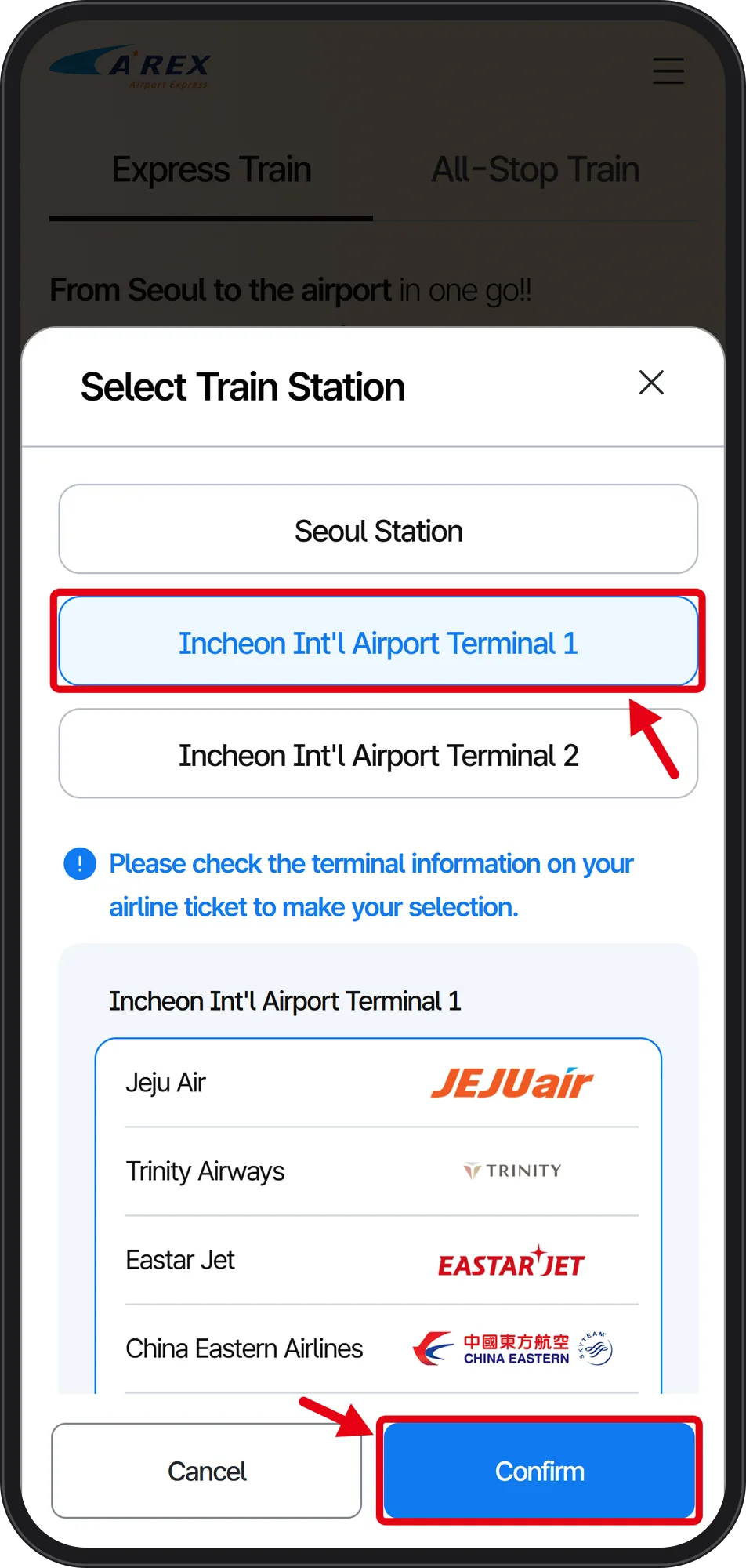
Departure Station opens a Select Train Station modal with three choices: Seoul Station, Incheon Int'l Airport Terminal 1, Incheon Int'l Airport Terminal 2.
 Source: AREX official booking site airportrailroad.com (captured Oct 1, 2026)
Under Terminal 1 the screen lists airlines using it — Jeju Air, Trinity Airways, Eastar Jet, China Eastern Airlines — with the notice "Please check the terminal information on your airline ticket to make your selection." The selected button shows blue text on a pale blue background; tap Confirm at the bottom.
 Source: AREX official booking site airportrailroad.com (captured Oct 1, 2026)
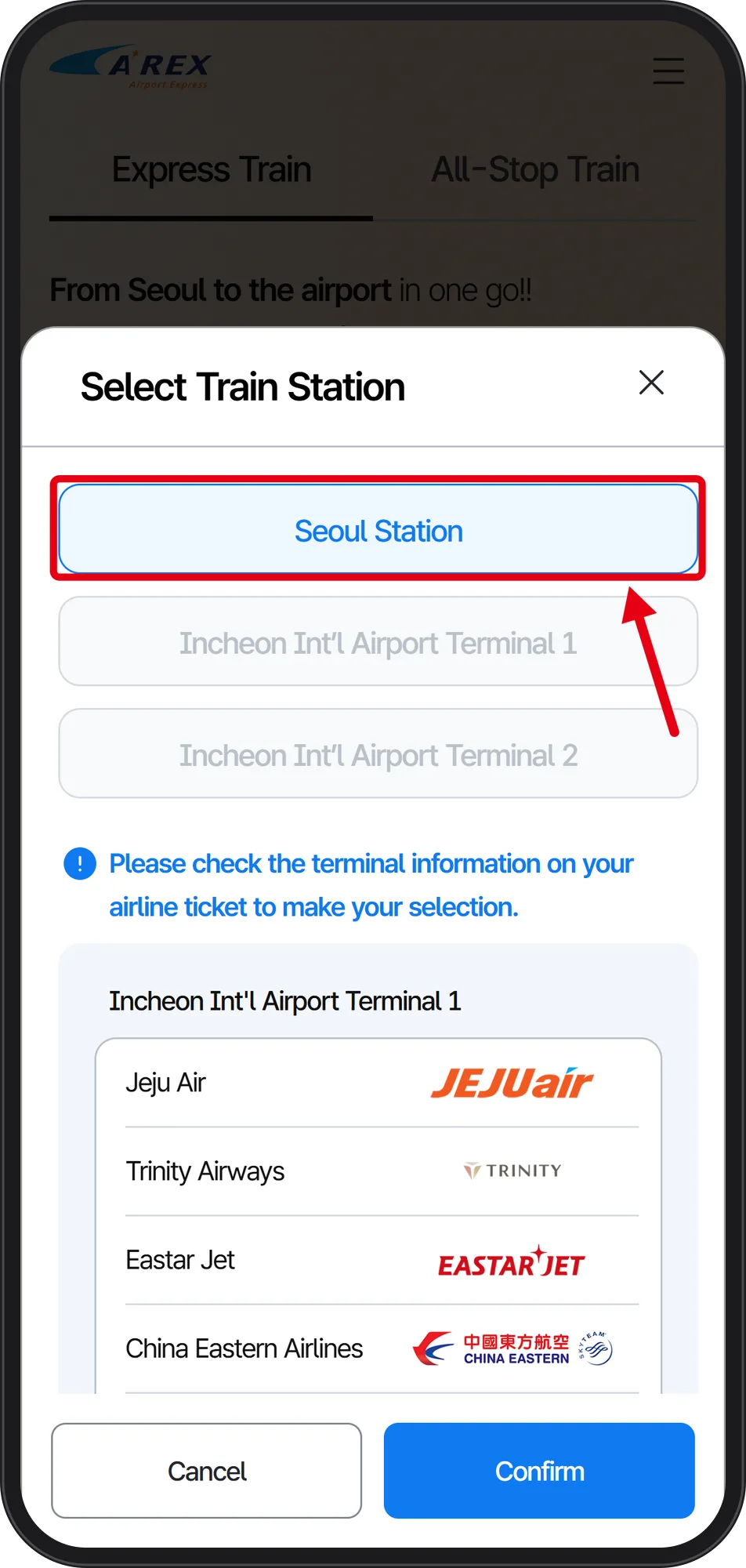
For Arrival Station the same modal reopens; here Seoul Station is boxed in red and active, while the terminal already set as departure appears greyed out. That greying is how you confirm you did not double-select. If the terminal is wrong, reopen this modal from the booking form before you tap Reserve.
Step 3. Read the Train List and the Booking Clock
 Source: AREX official booking site airportrailroad.com (captured Oct 1, 2026)
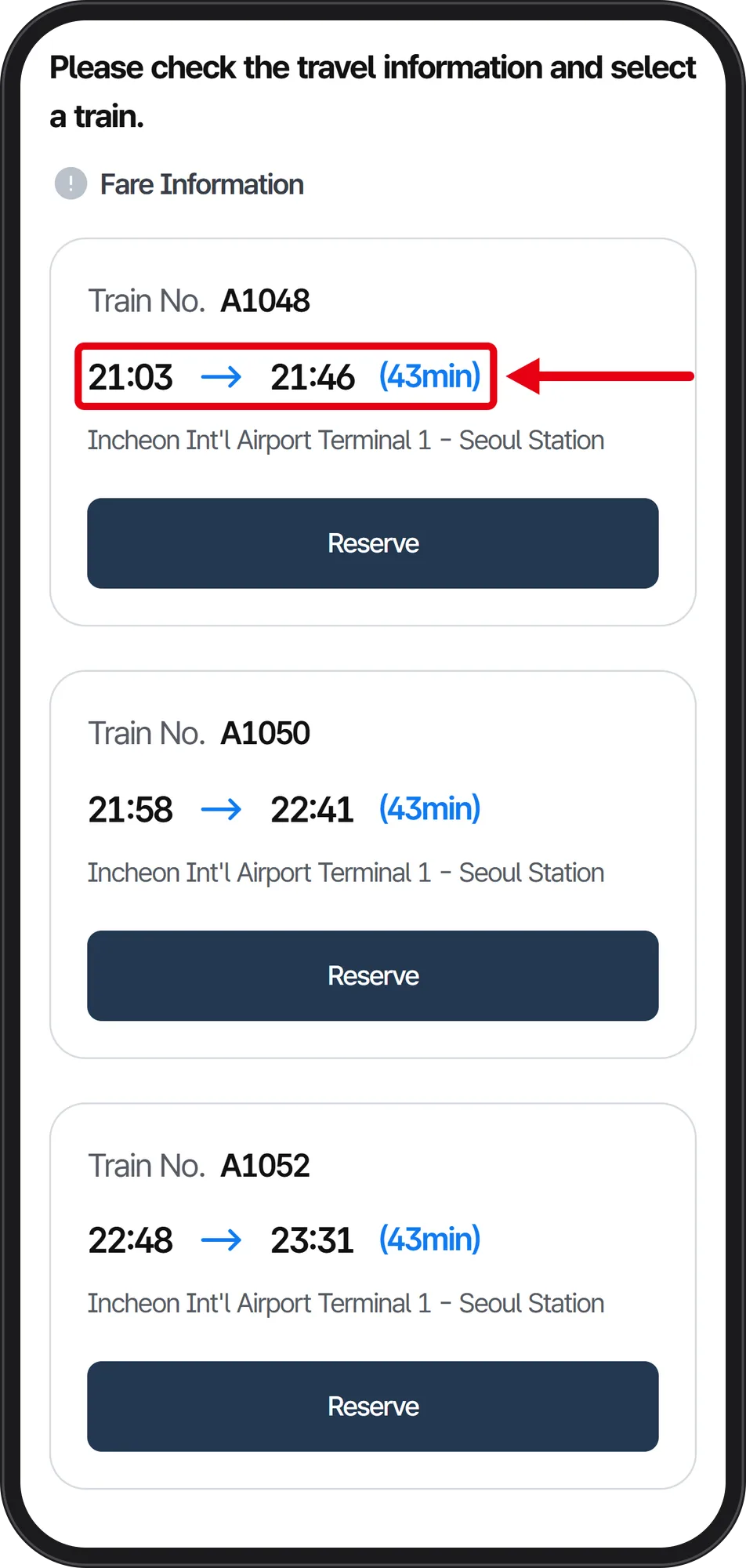
Search Trains returns cards headed "Please check the travel information and select a train": A1048 21:03 → 21:46 (43min), A1050 21:58 → 22:41, A1052 22:48 → 23:31. Train numbers step up by 2 and all three show the same 43min, so the only real choice is departure time.
Reservation closes 20 minutes before departure, and payment must be completed within 20 minutes of reserving. Booking opens up to 60 days ahead, with a maximum of 12 people per booking counting adults and children together. The boarding gate opens 30 minutes before departure and you must reach the platform by 3 minutes before.
What the Official Screens Did Not Show on 2026-10-01
The Express Train Fare Information link on the English booking screen returned to the first page that day, so no Express fare is quoted here. Fare Information also appears as a text link above the train cards on the results screen. Read the amount on the payment screen before confirming it.
The language and currency popup appearing only in Korean is the weakest point for a first-time arrival; remember the blue button is confirm. The captures stop at Reserve, so the login and payment screens are not described here. The site lists Visa, Mastercard, JCB, Diners Club, American Express and UnionPay for overseas cards, plus simple-pay options including Alipay, WeChat Pay, Kakao Pay and PAYCO (KakaoTalk's and NHN's Korean mobile payment apps).
If the Phone Fails: Machines, All-Stop Fares, Luggage
Ticket vending machines are on basement level 1 of the Transportation Center at Incheon Airport T1 and T2, and basement level 2 at Seoul Station. All-Stop fares with a transit card are 4,750 won from T1 to Seoul Station and 5,350 won from T2; a single-journey card costs 100 won more plus a 500 won deposit refunded at the arrival station.
On the Express timetable, trains start at T2 and reach T1 eight minutes later. The Incheon Airport English site lists T-Luggage, a same-day baggage delivery service between the airport and selected Seoul subway stations: book at tluggage.co.kr, counters at T1 3F opposite check-in counter B and T2 3F opposite counter H. AREX customer centre: +82-1599-7788.