Korea e-Arrival Card: Check If You Need One, Then File on the Official Site

The Korea e-Arrival Card is free, is filed only at www.e-arrivalcard.go.kr, and whether it applies to you is decided by the site's own Navigator rather than by a third-party list. The walkthrough below follows the official mobile screens as captured on 2026-10-02, button by button. It stops at the passport-entry step, which was not captured.
| Item | What the official screen shows |
|---|---|
| Official address | www.e-arrivalcard.go.kr (the only one) |
| Fee | No fee required |
| Filing window | Within 3 days before arrival in Korea (KST) |
| People per submission | Mobile web up to 9, PC up to 1,000 |
| Validity | 72 hours from submission; ends after immigration clearance |
| Languages | 한국어, English, 中文, 日本語, Tiếng Việt, ภาษาไทย, русский |
| Operator | 법무부 출입국·외국인정책본부 (Ministry of Justice) |
| Captured | 2026-10-02 |
Step 1. Open the official address and read the fake-site popup before anything else
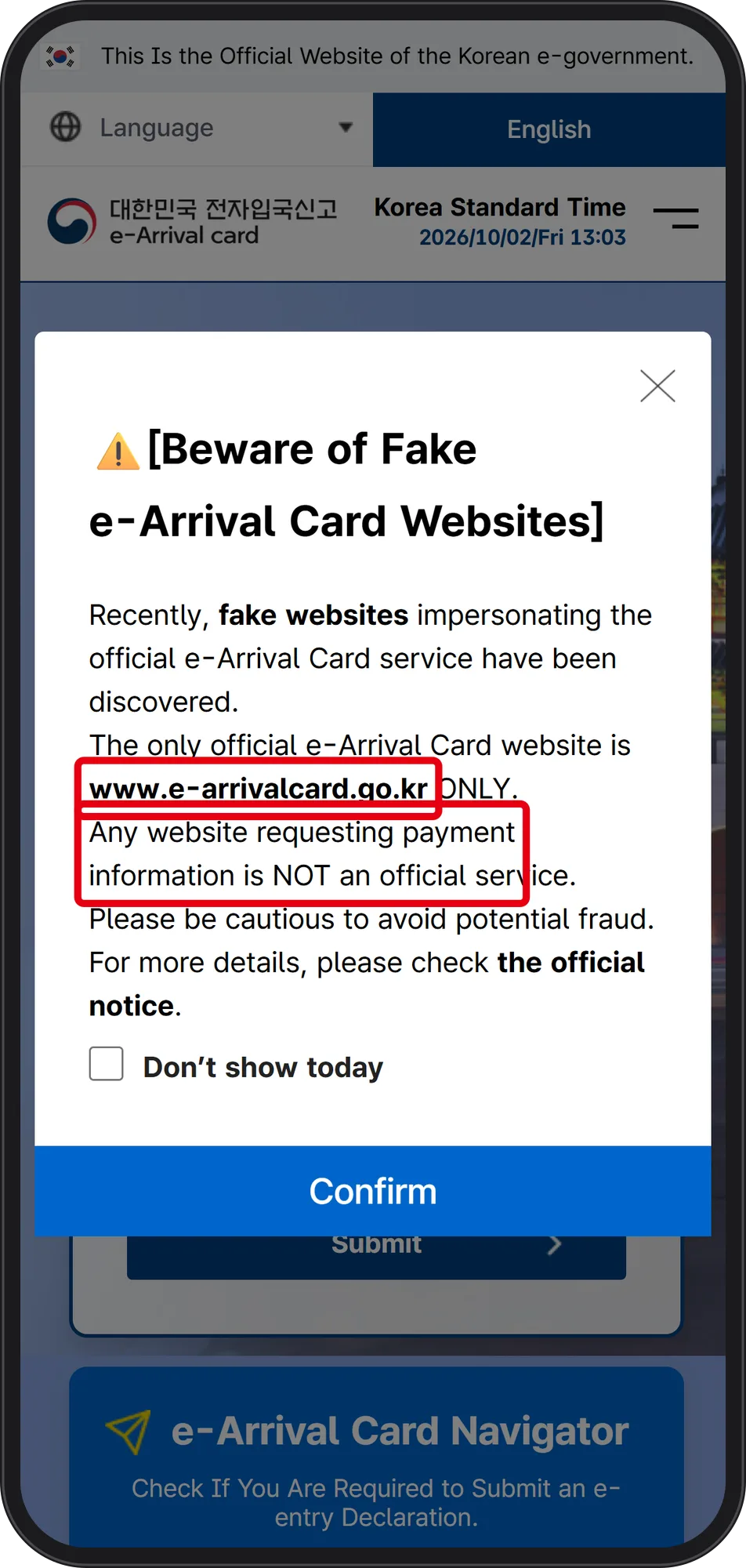 Source: Korea e-Arrival Card official website www.e-arrivalcard.go.kr (captured Oct 2, 2026)
The English landing page opens with a popup headed "[Beware of Fake e-Arrival Card Websites]". The red boxes mark the two lines that settle the question: the only official site is "www.e-arrivalcard.go.kr ONLY", and "Any website requesting payment information is NOT an official service". The same page states "No fee required", so any charge means you are on the wrong page.
The header also shows a Korea Standard Time clock — 2026/10/02/Fri 13:03 in this capture. That is the clock the filing window runs on, not your departure city's time.
Step 2. Switch the language and check the Dates Available for Entry Declaration
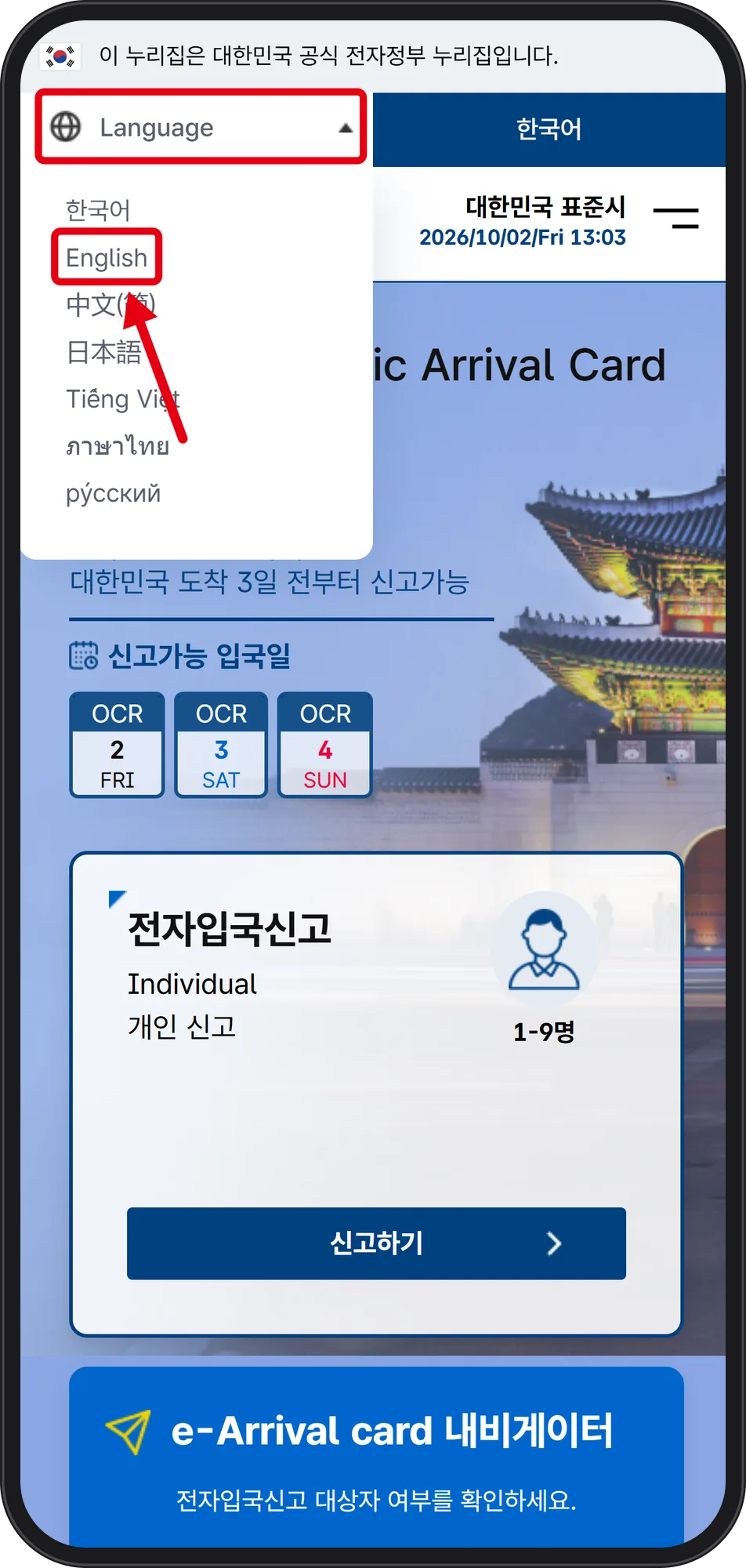 Source: Korea e-Arrival Card official website www.e-arrivalcard.go.kr (captured Oct 2, 2026)
The Language menu at the top opens a list of 한국어, English, 中文, 日本語, Tiếng Việt, ภาษาไทย and русский; the red mark sits on English. The page states "Complete and submit within 3 days before arrival in Korea" (대한민국 도착 3일 전부터 신고가능).
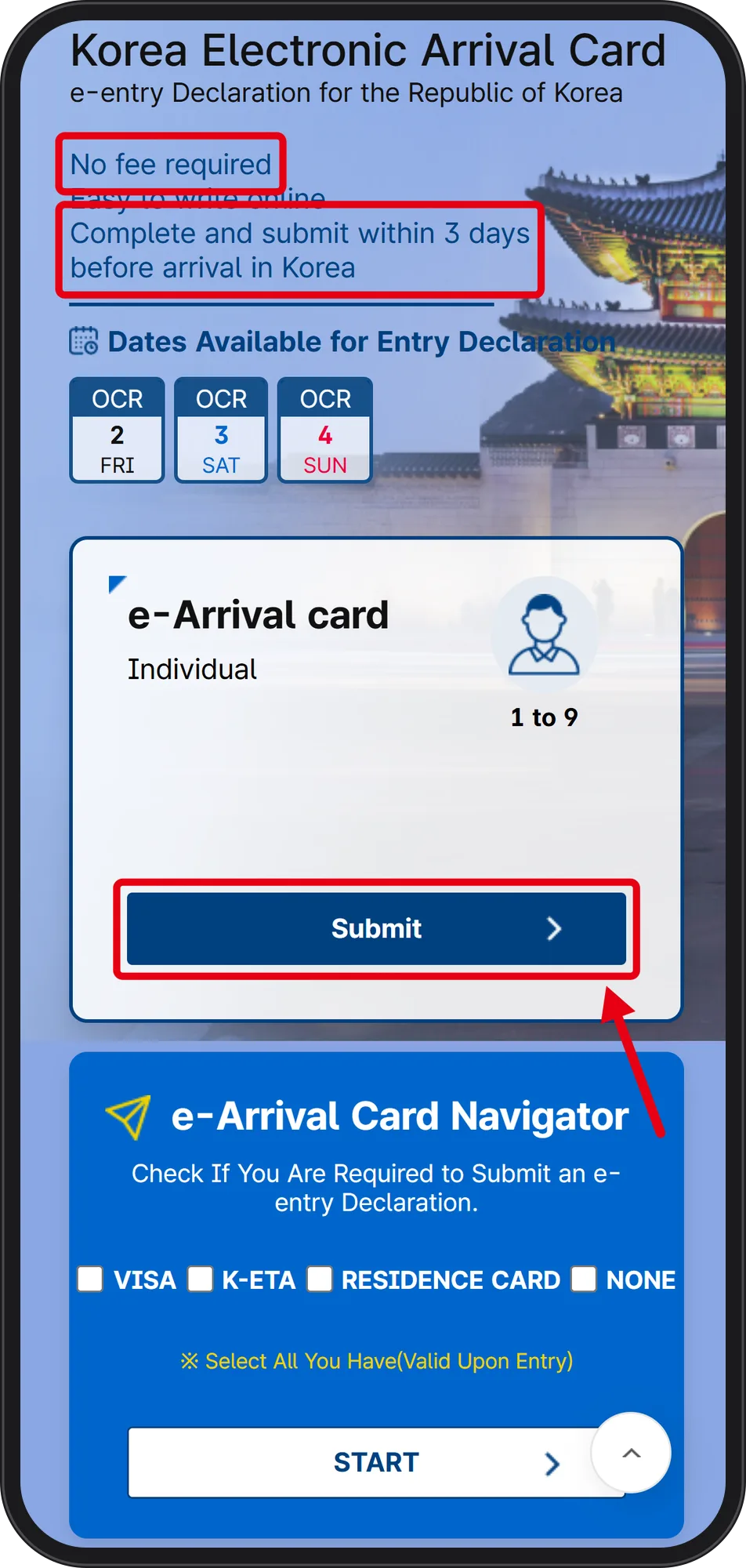 Source: Korea e-Arrival Card official website www.e-arrivalcard.go.kr (captured Oct 2, 2026)
Under "Dates Available for Entry Declaration" the screen listed three concrete chips on the 2026-10-02 capture: OCT 2 FRI, OCT 3 SAT, OCT 4 SUN. If your arrival date is not among the chips you are too early and should come back later. The red arrow points to the "Submit" button inside the "e-Arrival card / Individual / 1 to 9" card, which is the entry point used here.
Step 3. Run the e-Arrival Card Navigator: VISA, K-ETA, RESIDENCE CARD or NONE
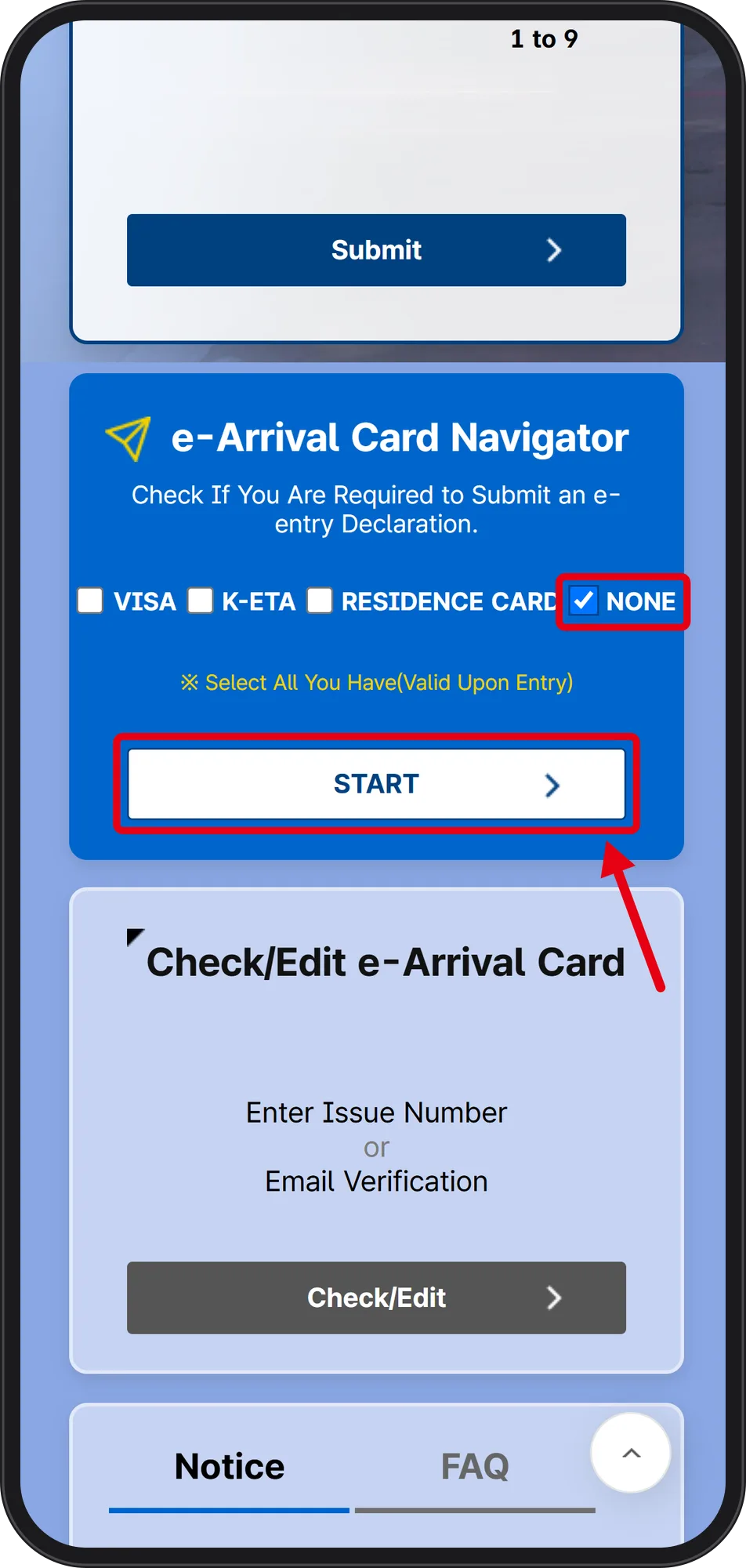 Source: Korea e-Arrival Card official website www.e-arrivalcard.go.kr (captured Oct 2, 2026)
The Navigator is headed "Check If You Are Required to Submit an e-entry Declaration." Four checkboxes — VISA, K-ETA, RESIDENCE CARD, NONE — sit under the instruction "※ Select All You Have(Valid Upon Entry)". Tick only what is valid on the day of entry, not something you once held; this capture ticked NONE, then START.
The official guide lists as subject: Korean visa holders, K-ETA exemption cases (nationals of temporarily K-ETA-exempt countries, those under 17 or over 65 among K-ETA-country nationals, diplomatic and official passport holders), SOFA active-duty personnel, UN passport and ABTC holders, and crew members. Excluded are Korean nationals, Residence Card holders (residence, permanent residence, overseas-Korean residence), people who already hold a K-ETA, and group e-visa holders. The catch stated in the guide: holding a K-ETA but entering on a visa puts you back in the submit group, which is why running your own combination beats reading a list.
Step 4. Pick country, passport type and destination, then read the verdict sentence
 Source: Korea e-Arrival Card official website www.e-arrivalcard.go.kr (captured Oct 2, 2026)
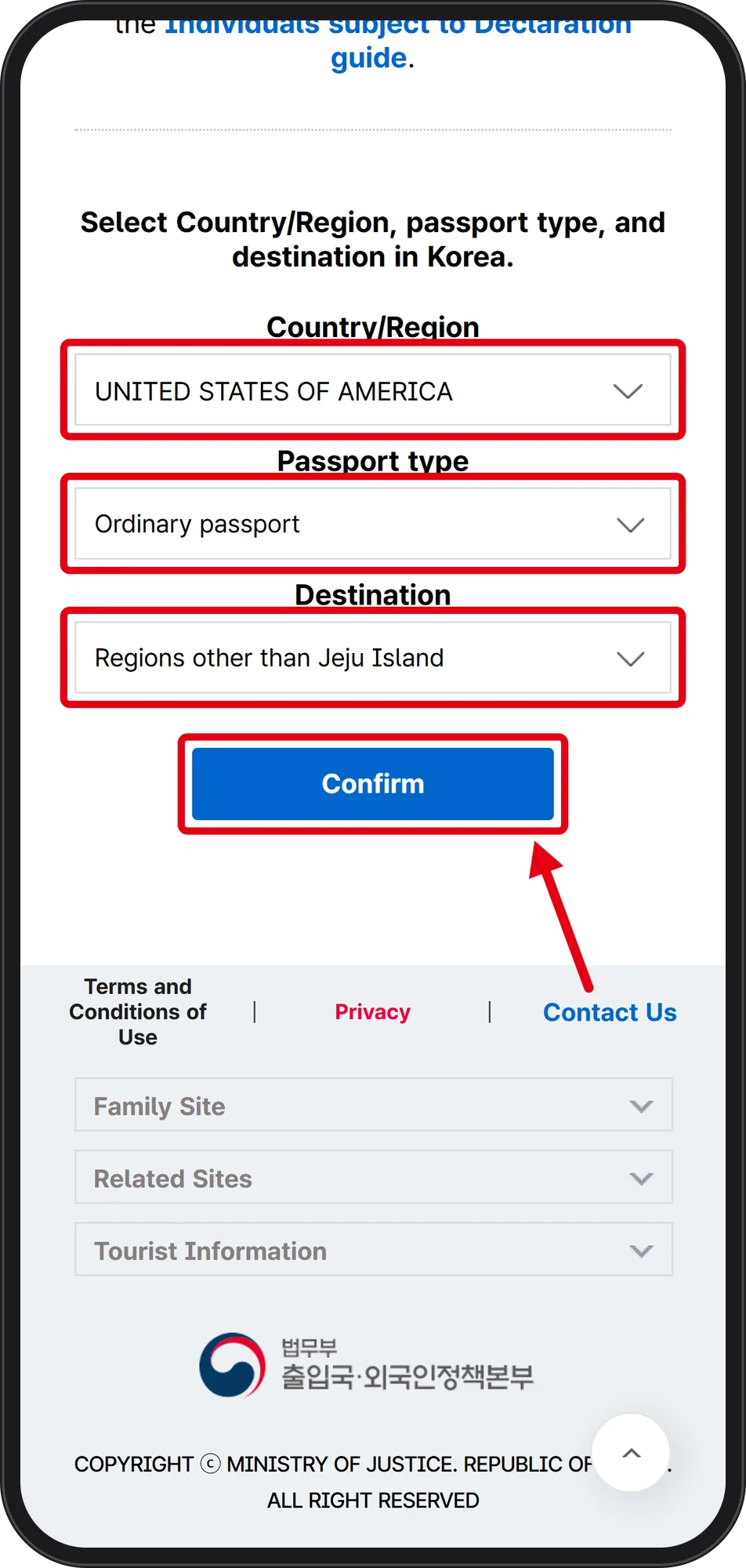
Three dropdowns appear on one screen — Country/Region, Passport type, Destination — above a "Confirm" button. The captured example is UNITED STATES OF AMERICA, Ordinary passport, Regions other than Jeju Island. The destination list separates Jeju Island from other regions, so choose the region you actually land in. The footer credits 법무부 출입국·외국인정책본부 (Ministry of Justice Immigration Service) as operator.
 Source: Korea e-Arrival Card official website www.e-arrivalcard.go.kr (captured Oct 2, 2026)
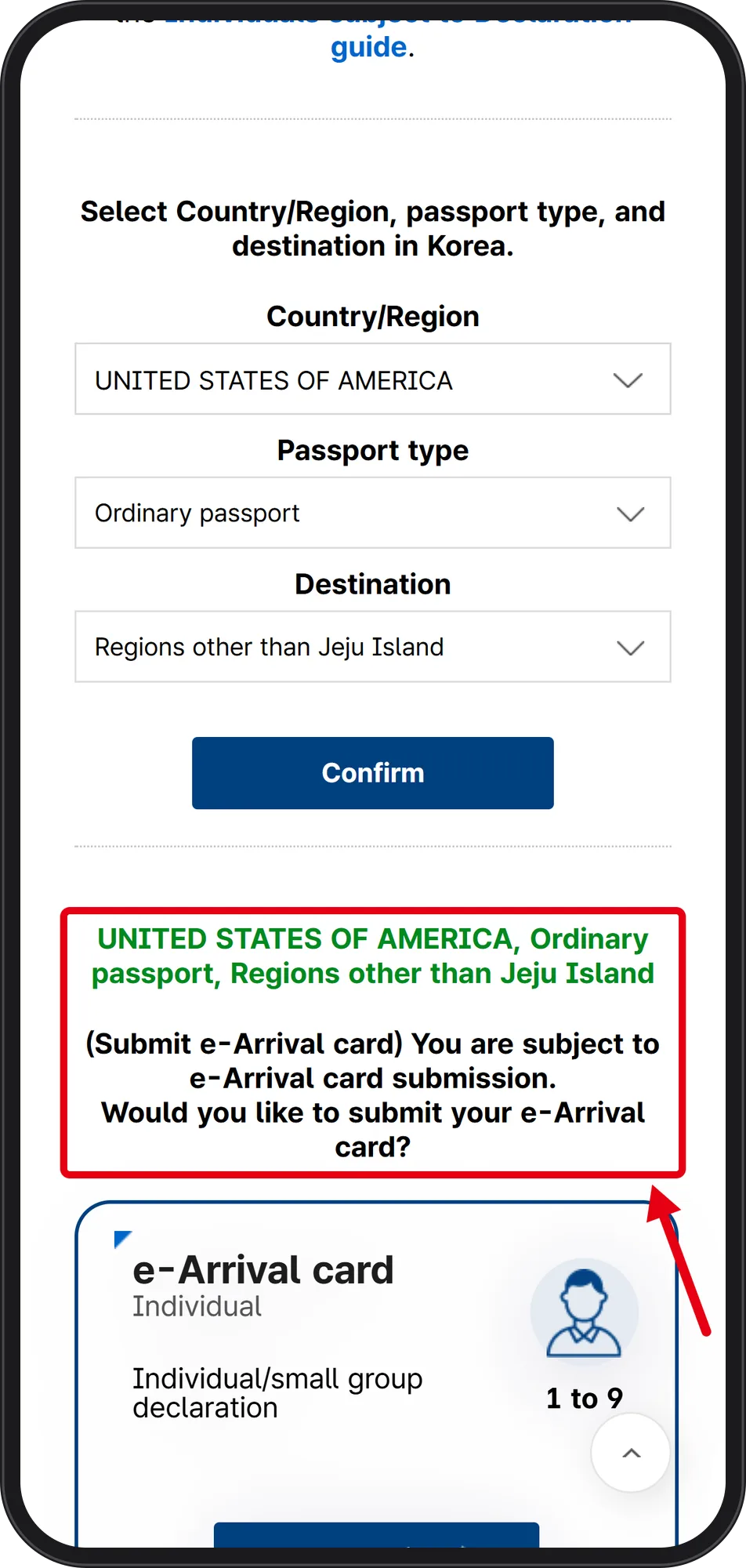
After Confirm, the red-boxed verdict card repeats the combination and reads: "(Submit e-Arrival card) You are subject to e-Arrival card submission. Would you like to submit your e-Arrival card?" next to the 1 to 9 person icon.
Step 5. What happens after the Navigator: five form steps, 72 hours, and edits
The official procedure guide lists five steps: ① terms agreement and email, where the representative filer types the email twice and a person aged 14 or under cannot be the representative; ② passport information for up to 9 people; ③ travel itinerary; ④ review; ⑤ submit, with a PDF and email confirmation. The only stated requirement is a valid passport. One submission covers up to 9 people on mobile web and up to 1,000 on PC.
The issue number arrives by email. You do not have to carry it through immigration, but knowing it helps. Afterwards, "Check/Edit" on the official site (issue number or email verification) lets you look up and change entry purpose, stay details and departure date; the arrival date can only be changed within 3 days of the original submission.
Validity expires 72 hours after submission and also ends once you clear immigration, so a re-entry needs a new submission. A submitted e-Arrival Card replaces the paper arrival card, the e-Arrival Card and K-ETA are separate systems, and false entries can lead to penalties or entry restrictions.
What this walkthrough did not check, and one dated outage to plan around
Screens after the passport-entry step were not captured because they hold personal data, so field-level rules — name order, passport number case, date format, how to write a stay address — are not verified here. The notice "User Authentication Procedure for e-Arrival Card Submission" (2026-04-29) was visible on the site but its authentication method was not opened.
The site also posted a scheduled service suspension: 2026-10-08 18:00 – 10-09 02:30 KST. Anyone arriving in that window should file in advance. The site's own popup warns that look-alike sites exist, so type www.e-arrivalcard.go.kr yourself rather than trusting a link.
Related official sites listed on the page: Hi Korea www.hikorea.go.kr, Visa Portal www.visa.go.kr, K-ETA www.k-eta.go.kr. For anything that changed after 2026-10-02, the Notice and FAQ menus sit at the bottom of the mobile landing page.
