Korea Travel Essentials #4: Set Up k.ride for Taxis and Add a Foreign Card

Part 4 of Korea Travel Essentials — five things to set up before you arrive in Korea.
k.ride is a taxi app you can set up before landing, and its payment screen is written for visitors: next to the card options it says "Cards issued in Korea not accepted." The screens below were captured on 8 October 2026 on an iPhone with the app language set to English, from install through the card form.
| Step | Screen | Can you defer it? |
|---|---|---|
| 1 | App Store listing | — |
| 2 | Language + Get Started | No |
| 3 | Phone number, 4-digit code | No |
| 4 | Google / Apple / email | No, stated as required |
| 5 | Payment method | Yes — "Register later" |
| 6 | Card form (₩100 check) | Yes, if you tapped Register later |
Step 1. Find k.ride in the App Store and check you have the right app
Korea Tourism Organization's official VisitKorea page "Essential Transit Apps" lists it as "4. Hailing Taxis via k.ride — Get to your destination without complicated verification," with available languages given as English, Chinese (Simplified/Traditional) and Japanese, and downloads for Android and iOS.
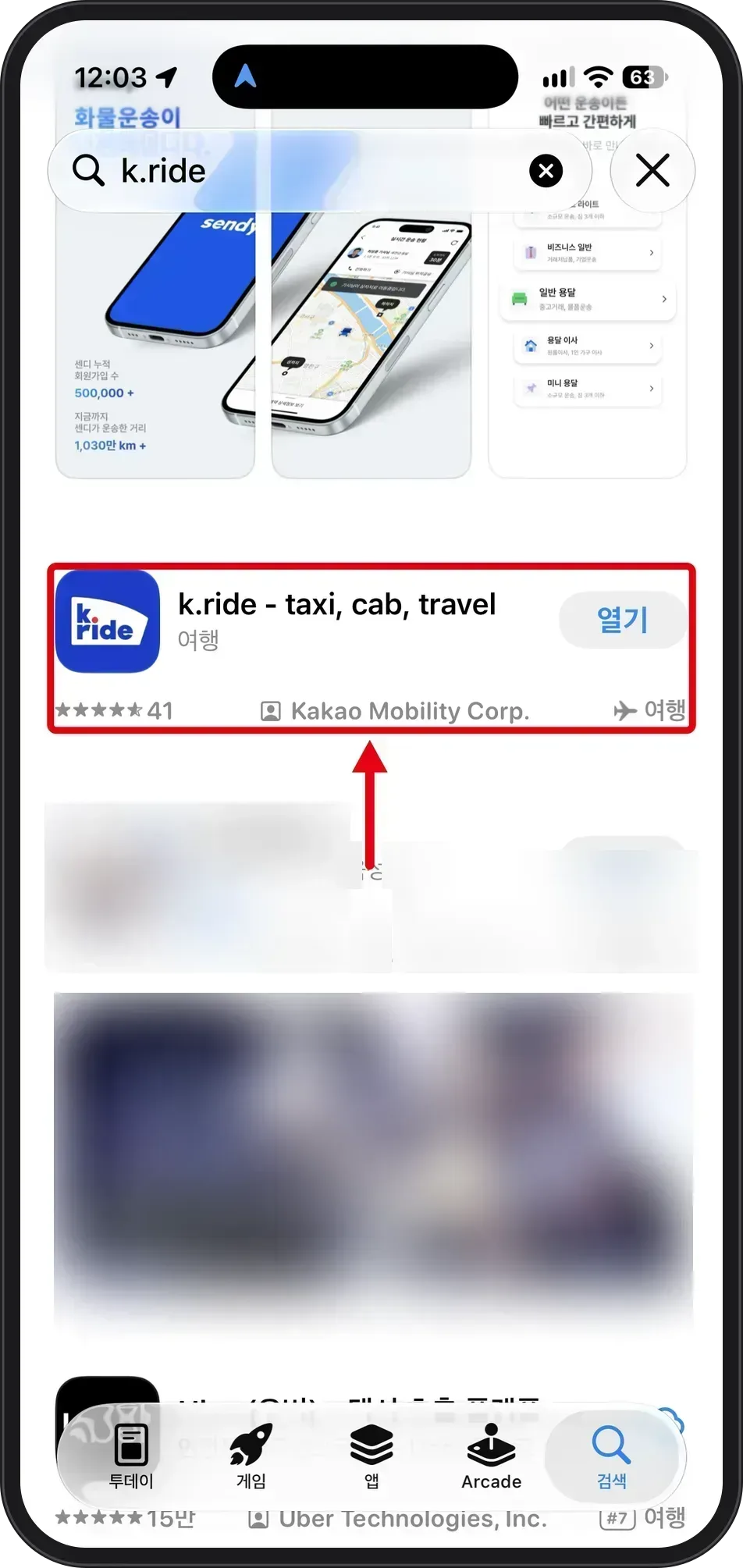 Source: Apple App Store, Korean storefront (captured Oct 8, 2026)
The listing reads "k.ride - taxi, cab, travel," developer Kakao Mobility Corp., category 여행 (Travel), 41 ratings. The capture comes from the Korean storefront, so store labels around it appear in Korean (열기 = Open, 받기 = Get) while the app itself runs in English.
Step 2. Switch the language to English, then tap Get Started
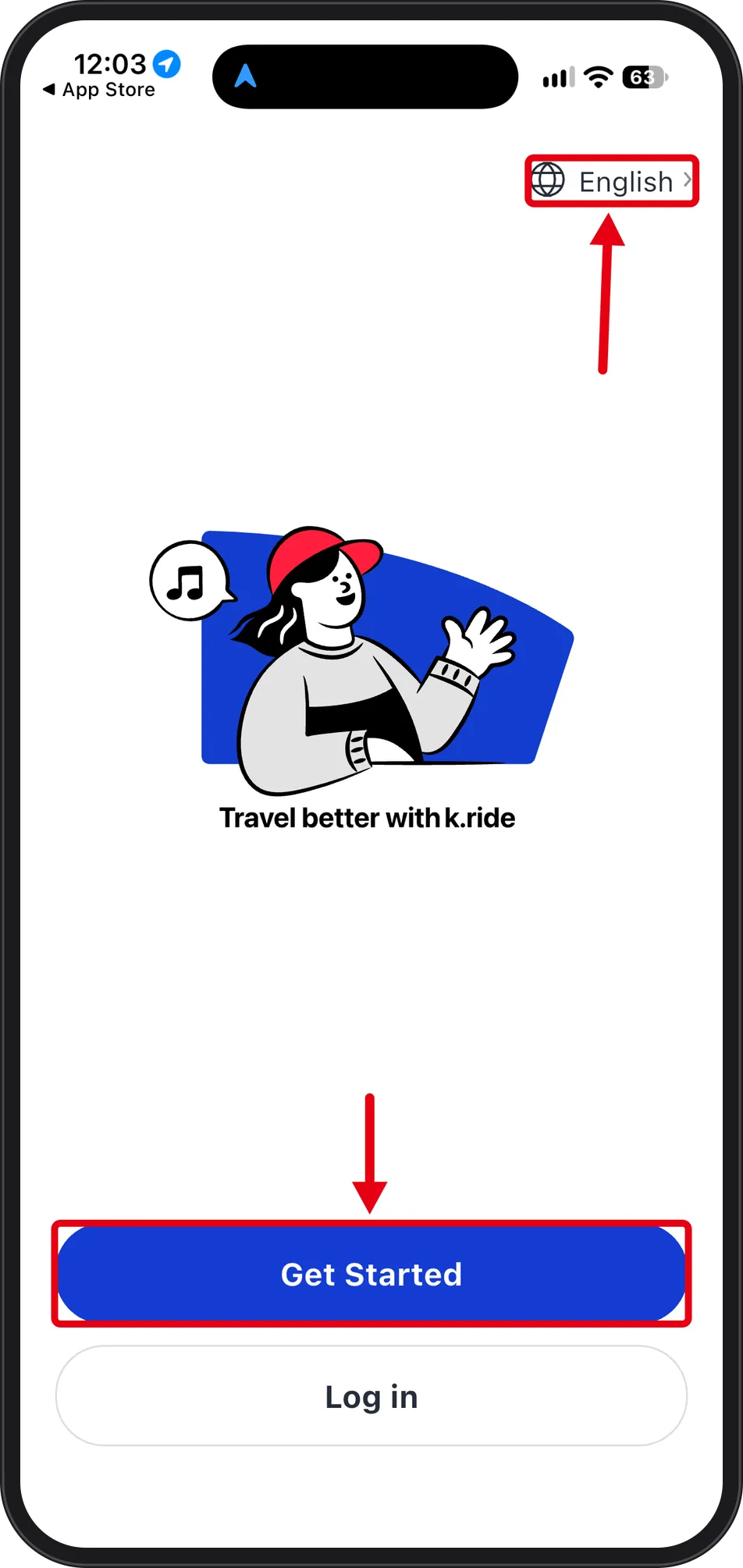 Source: k.ride app, iPhone, app language English (captured Oct 8, 2026)
The launch screen shows a language selector at the top right reading "English >" above the headline "Travel better with k.ride," then two buttons: Get Started and Log in. Because the language control sits on this first screen, there is no need to dig through settings afterwards. Get Started leads to phone verification next.
Step 3. Enter your phone number and choose SMS or WhatsApp for the code
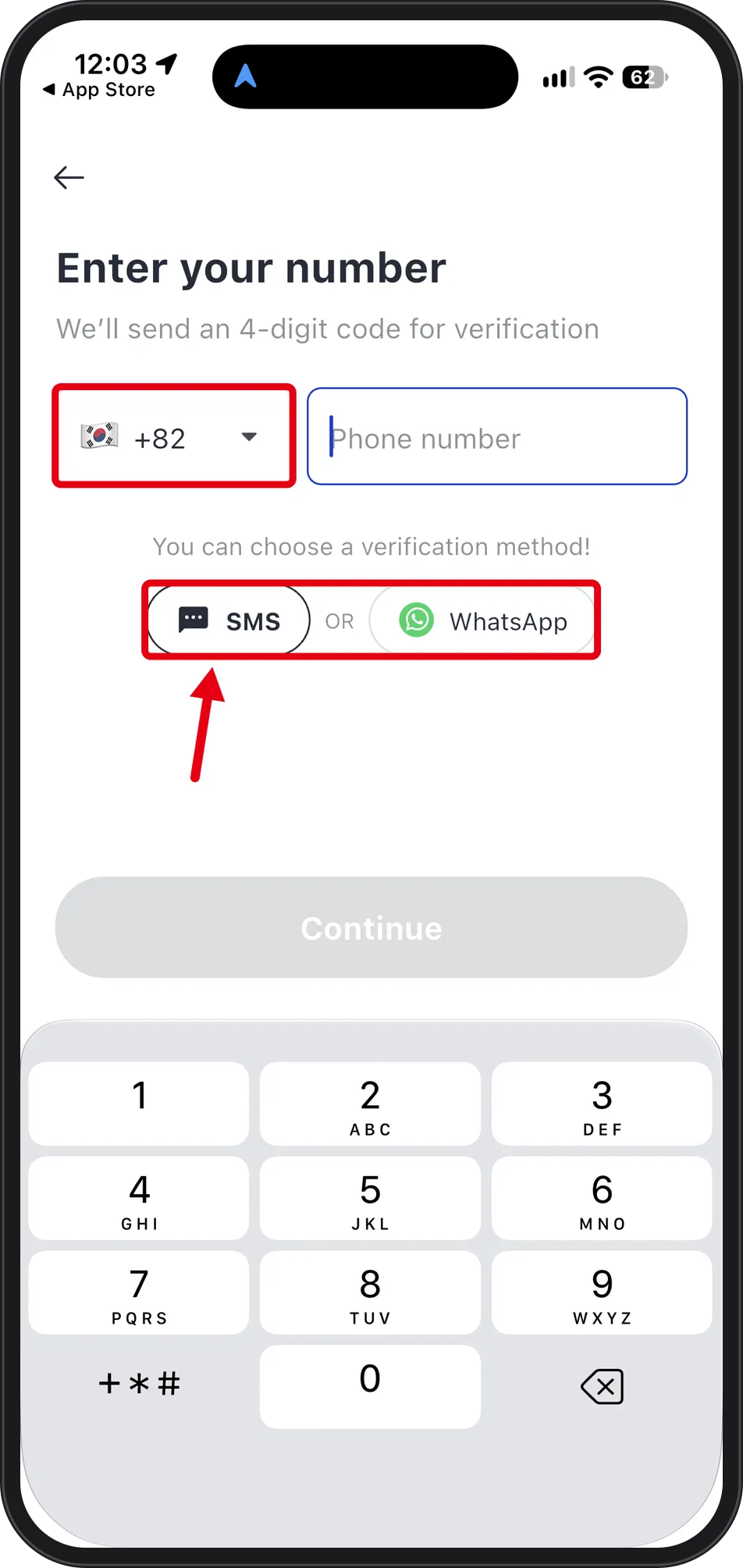 Source: k.ride app, iPhone, app language English (captured Oct 8, 2026)
The screen is titled "Enter your number" with the note "We'll send an 4-digit code for verification" (wording as printed, grammar slip included). The code is four digits, not six. The country code field defaults to +82 and has an expand arrow beside it, so the country code can be changed here.
Below the number field: "You can choose a verification method!" with SMS OR WhatsApp, then Continue. WhatsApp runs over data rather than SMS roaming, which matters if your roaming texts are unreliable — but the capture stops at the choice and does not prove that a code arrives. The country list was not expanded, so this article makes no claim about which countries are selectable.
Step 4. Connect an account with Google, Apple, or email
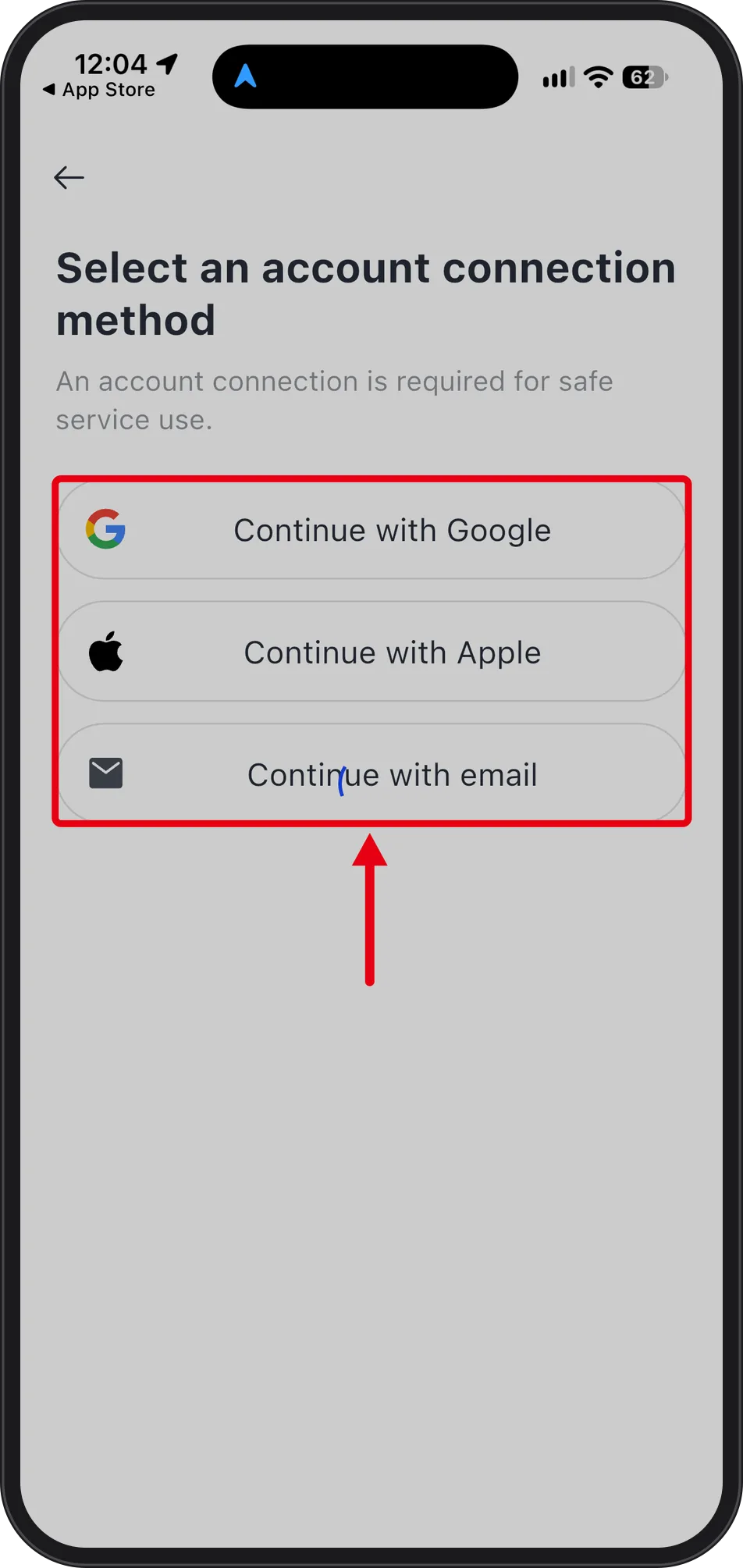 Source: k.ride app, iPhone, app language English (captured Oct 8, 2026)
"Select an account connection method" appears with the line "An account connection is required for safe service use." Three options follow in order: Continue with Google, Continue with Apple, Continue with email. The wording presents linking as required, unlike the payment step that comes next. Pick a login you can still open while travelling.
Step 5. Register a payment method — and read the line about Korean-issued cards
 Source: k.ride app, iPhone, app language English (captured Oct 8, 2026)
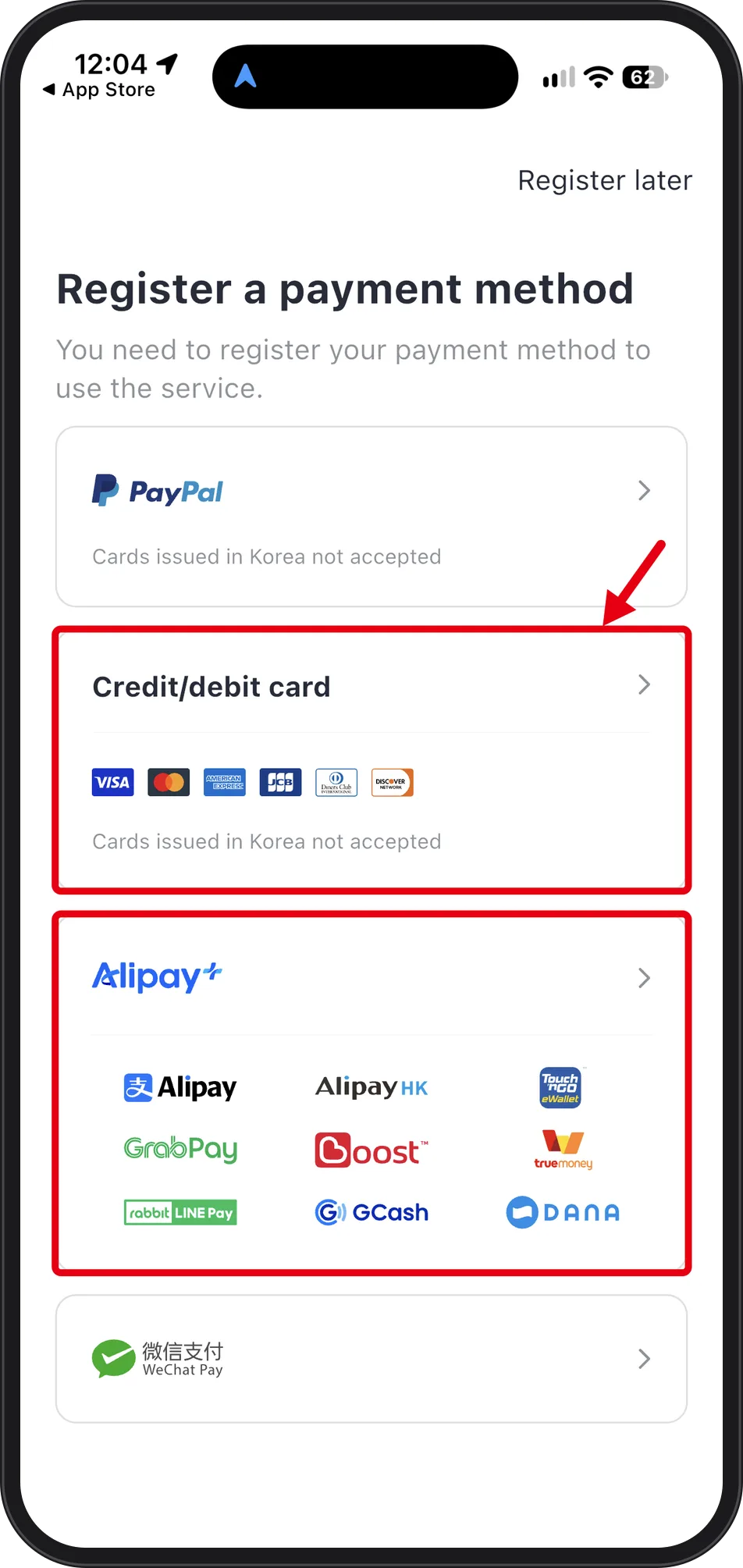
"Register a payment method" states "You need to register your payment method to use the service," yet Register later sits at the top right, so the step can be deferred. Four options appear:
| Option | Shown on screen |
|---|---|
| PayPal | "Cards issued in Korea not accepted" |
| Credit/debit card | VISA, Mastercard, American Express, JCB, Diners Club, Discover — "Cards issued in Korea not accepted" |
| Alipay+ | Alipay, AlipayHK, Touch 'n Go eWallet, GrabPay, Boost, TrueMoney, rabbit LINE Pay, GCash, DANA |
| WeChat Pay | — |
Read that label the right way around: the app is built for overseas payment instruments, so the card likely to be rejected here is one issued by a Korean bank. If one card fails, the order this screen allows is: another network card → PayPal → Alipay+ or WeChat Pay → or tap Register later and settle the question before you need a ride.
Step 6. The card form, the ₩100 verification charge, and what these screens do not prove
 Source: k.ride app, iPhone, app language English (captured Oct 8, 2026)
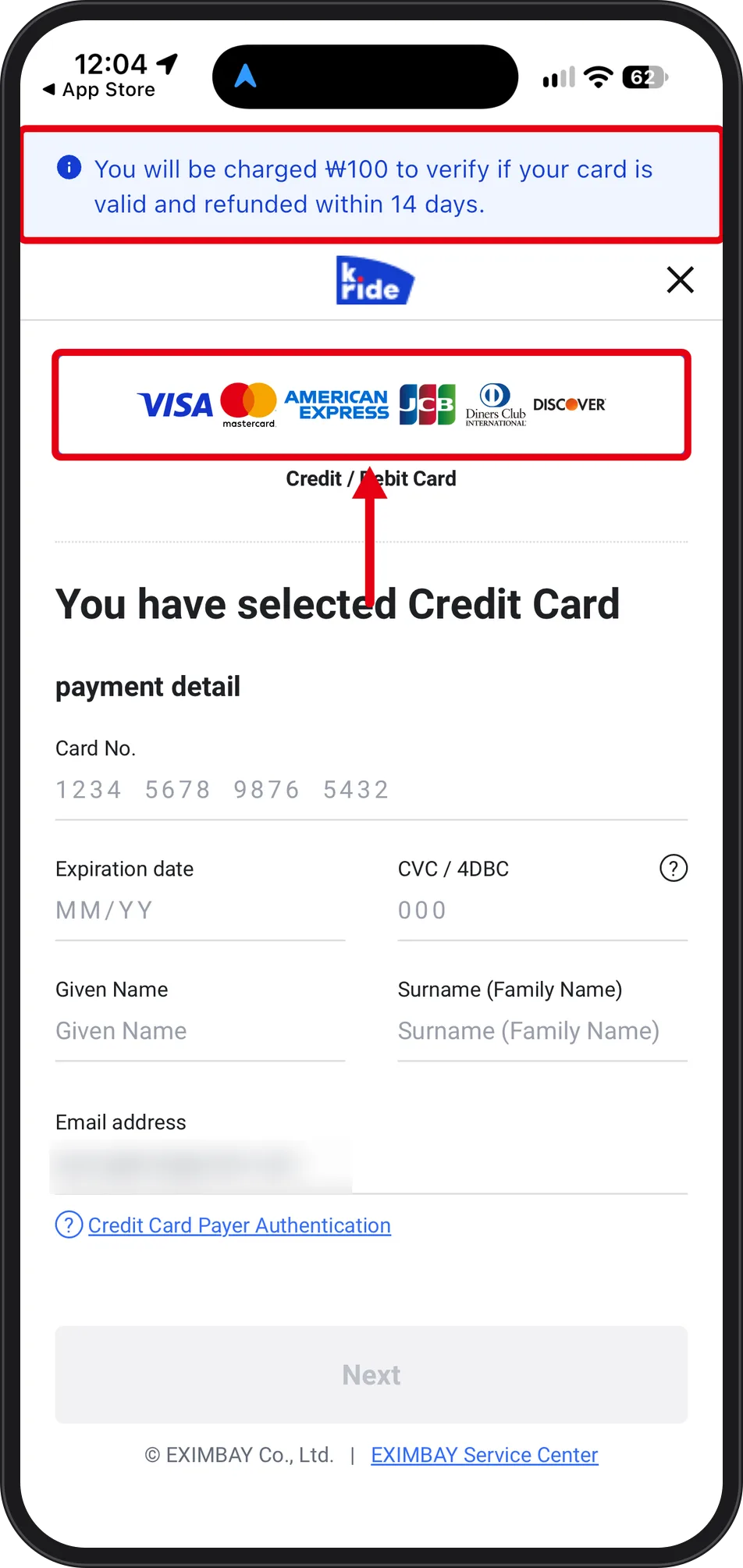
A banner tops the form: "You will be charged ₩100 to verify if your card is valid and refunded within 14 days." Visible fields are Card No., Expiration date, CVC / 4DBC, Given Name, Surname (Family Name), Email address, plus a "Credit Card Payer Authentication" link and a Next button. No billing address or postal code field appears — worth knowing if your issuer normally expects AVS data. The footer reads "© EXIMBAY Co., Ltd. | EXIMBAY Service Center."
What these six screens do not show: the capture stops before a card number was entered, so there is no evidence here about whether 3D Secure or an OTP prompt appears, whether the 4-digit code actually arrives, or whether sign-up completes on a non-Korean number. Fares, call fees, vehicle types, the hailing flow and arrival times were not on screen and are not covered. For the service description and language support, check the VisitKorea "Essential Transit Apps" page; for payment-side questions, the card form points to the EXIMBAY Service Center.
Back to the series: Korea Travel Essentials: 5 Things to Set Up Before You Arrive


