Korea Travel Essentials #2: Get a T-money Card and Top It Up with Cash

Part 2 of Korea Travel Essentials — five things to set up before you arrive in Korea.
Top up a T-money card with Korean won cash at a convenience store or a subway station machine, in ₩1,000 units, up to ₩90,000 per transaction. Every figure below comes from Tmoney's own official pages captured on October 9, 2026 — including the Korean-language top-up location page, translated here. The official foreigner guide describes cash only, so plan around won notes rather than your home credit card.
| Item | What the official pages say |
|---|---|
| Where | Convenience stores, subway top-up machines and information centers, Tmoney Town |
| Unit | ₩1,000 |
| Per transaction | ₩1,000 – ₩90,000 |
| Balance ceiling | ₩500,000 |
| Payment | Cash in Korean won (foreigner guide) |
| Refund fee | ₩500, card cost not refunded |
Step 1. Pick a top-up spot from Tmoney's own list
The English "User Guide (Foreigner)" lists these convenience stores: GS25, CU, 7-Eleven, MINISTOP, Story Way, Emart24, 365PLUS. Under "Subway Stations (Top-up Only)" it names the top-up machine including the one-time ticket issuer, the Tmoney vending machine, the portable reload machine, and the Information Center. Under "Others" it lists Tmoney Town at Seoul Station Exit #10, Seoul City Tower 1F.
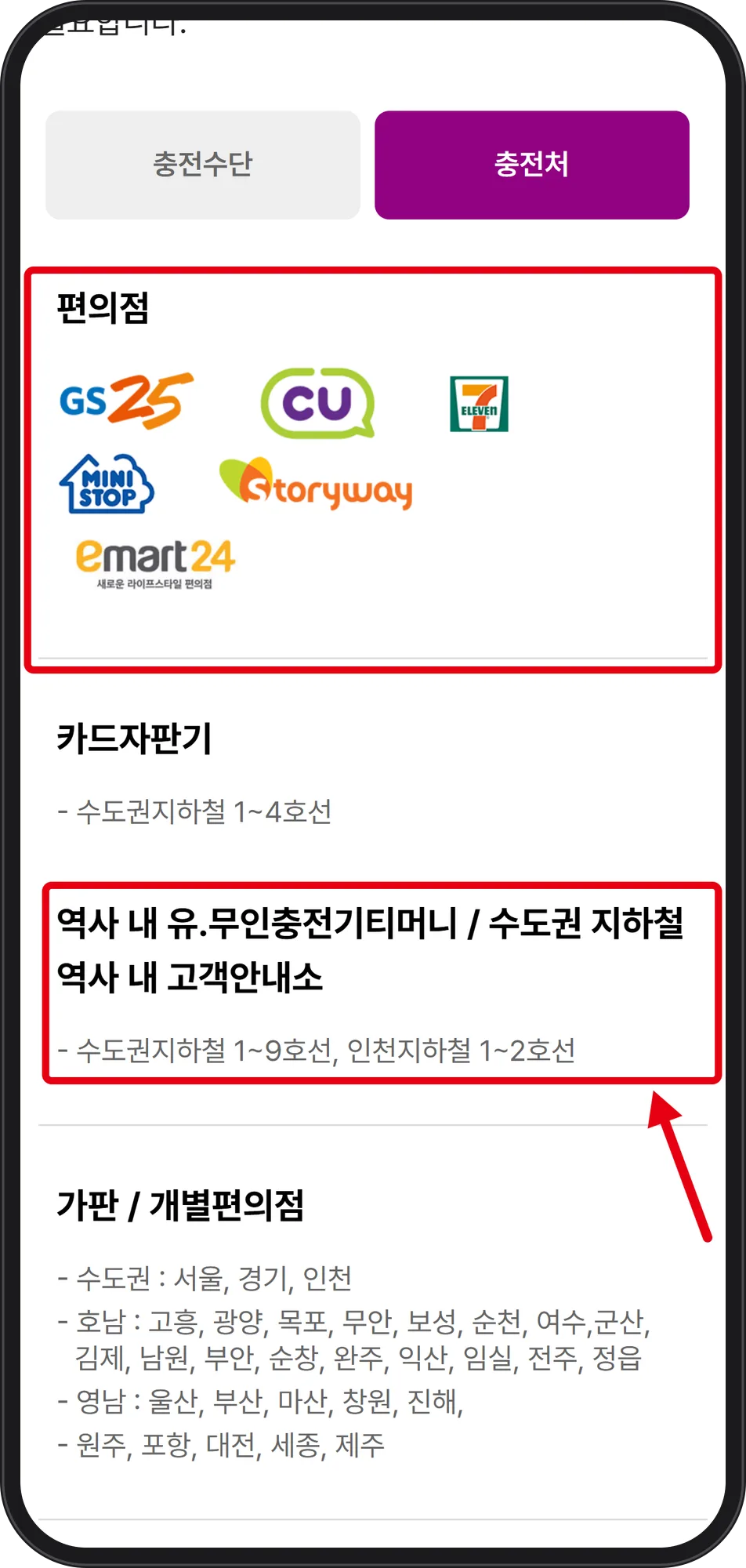 Source: Tmoney official website, Korean-language top-up location page (captured Oct 9, 2026)
This location page is written in Korean only; the wording here is a translation. The top red box is 편의점 (convenience stores), shown as brand logos. The second red box reads 역사 내 유·무인충전기티머니 / 수도권 지하철 역사 내 고객안내소 — staffed and self-service top-up machines inside stations, and the customer information centers of Seoul-area subway stations — for Seoul metropolitan subway lines 1–9 and Incheon Subway lines 1–2. Between the two, the page also lists 카드자판기 (card vending machines) for Seoul metropolitan subway lines 1–4. Below the boxes, 가판 / 개별편의점 (newsstands and independent convenience stores) are listed for Seoul, Gyeonggi and Incheon, then by region: Honam cities such as Mokpo, Suncheon, Yeosu and Jeonju; Yeongnam cities such as Ulsan, Busan and Changwon; and Wonju, Pohang, Daejeon, Sejong and Jeju. Note one mismatch: the English guide includes 365PLUS, while the Korean page's logo row shows GS25, CU, 7-Eleven, MINISTOP, Storyway and emart24.
Step 2. Hand over the card with won cash in ₩1,000 units
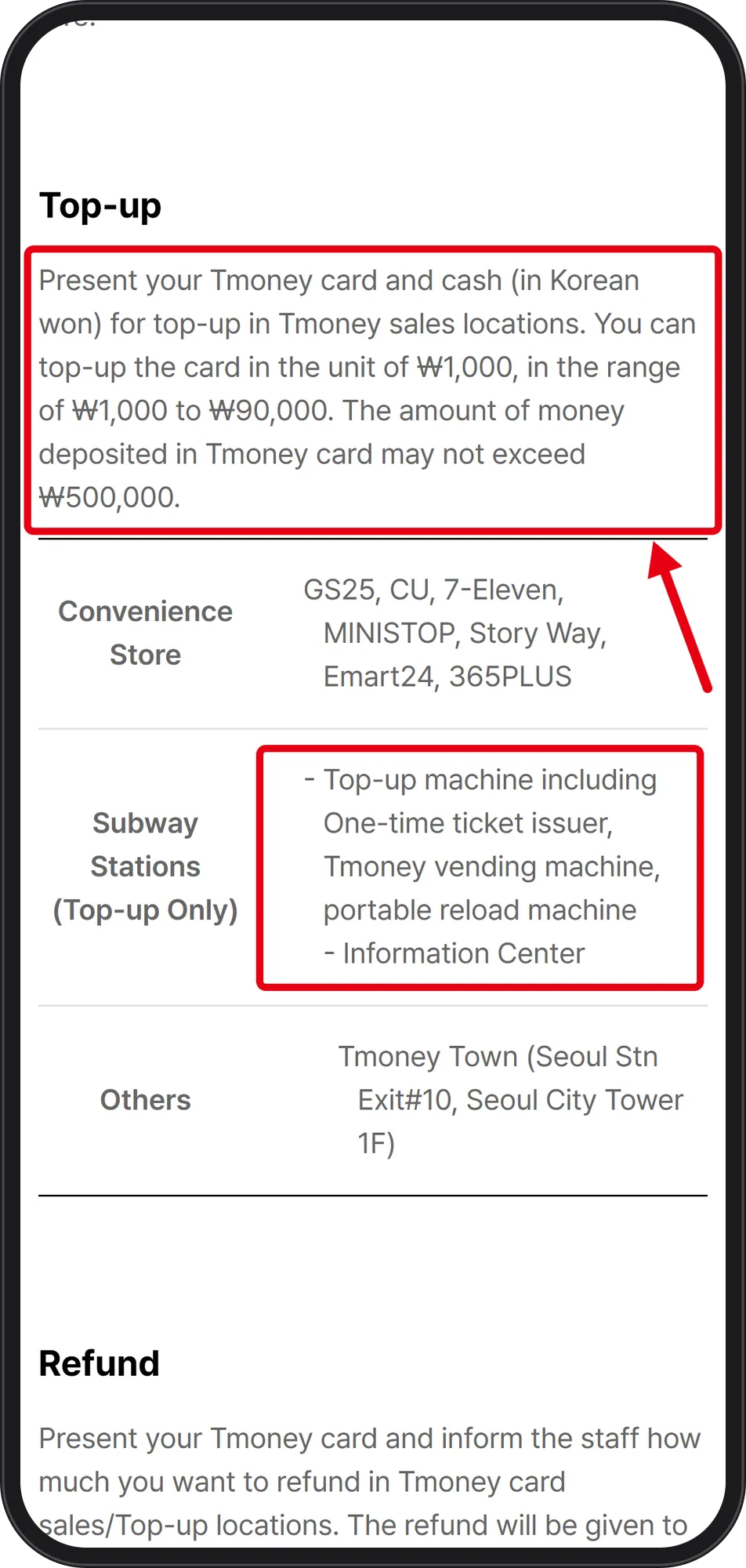 Source: Tmoney official website, User Guide (Foreigner) (captured Oct 9, 2026)
The boxed paragraph reads: "Present your Tmoney card and cash (in Korean won) for top-up in Tmoney sales locations. You can top-up the card in the unit of ₩1,000, in the range of ₩1,000 to ₩90,000. The amount of money deposited in Tmoney card may not exceed ₩500,000."
Two practical readings. The ₩90,000 per-transaction cap means filling a card toward the ₩500,000 ceiling takes repeated transactions. And since this guide describes cash in Korean won, get won first — nothing on these screens states whether credit cards or overseas-issued cards are accepted for top-up.
Step 3. Transfer within 30 minutes to keep the discount
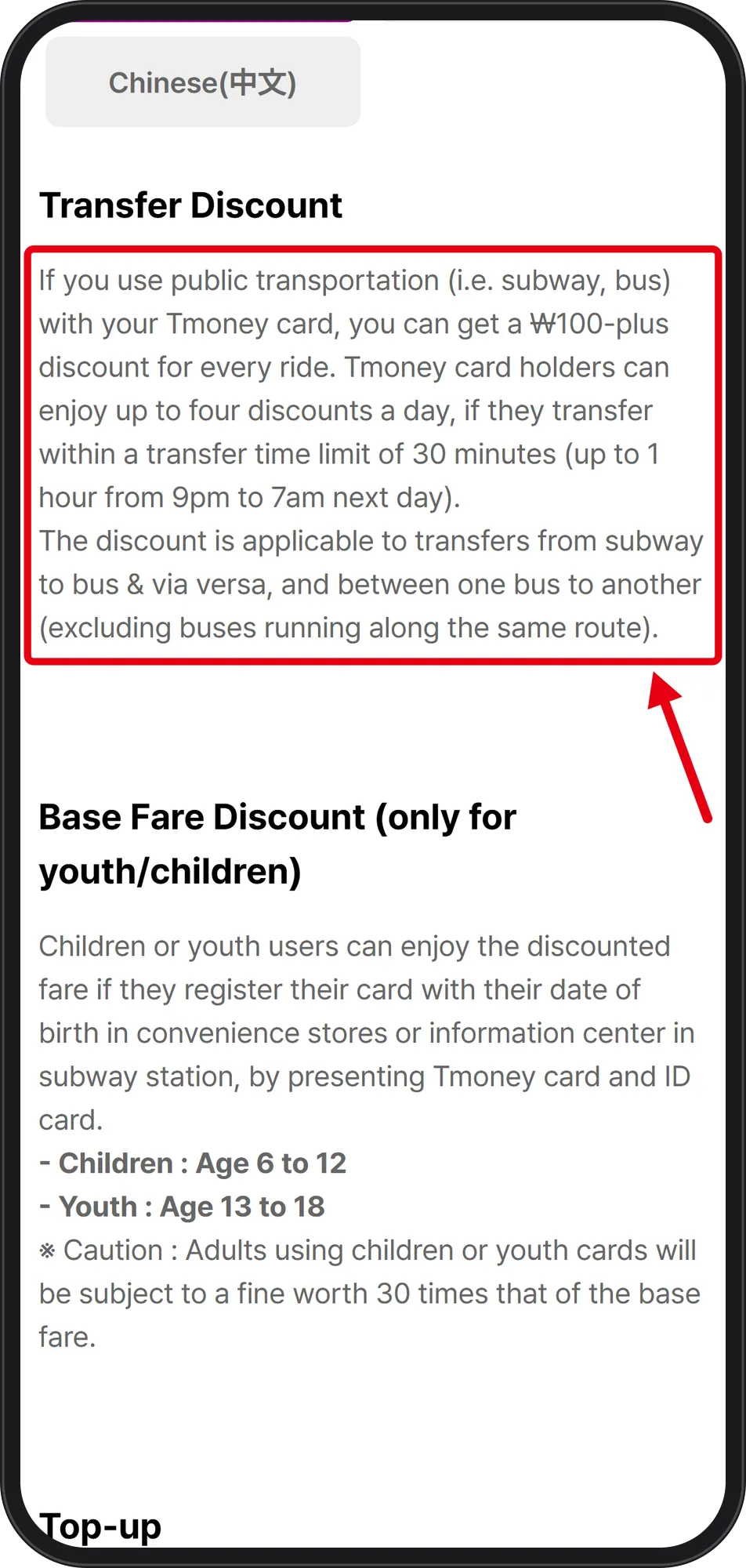 Source: Tmoney official website, User Guide (Foreigner) (captured Oct 9, 2026)
The same official guide describes the transfer benefit: "you can get a ₩100-plus discount for every ride. Tmoney card holders can enjoy up to four discounts a day, if they transfer within a transfer time limit of 30 minutes (up to 1 hour from 9pm to 7am next day)."
The discount applies to transfers from subway to bus and vice versa, and from one bus to another — excluding buses running along the same route. The 30-minute window is the number to remember when a transfer involves a walk between stops.
Step 4. Don't count on the Mobile Tmoney app being in English
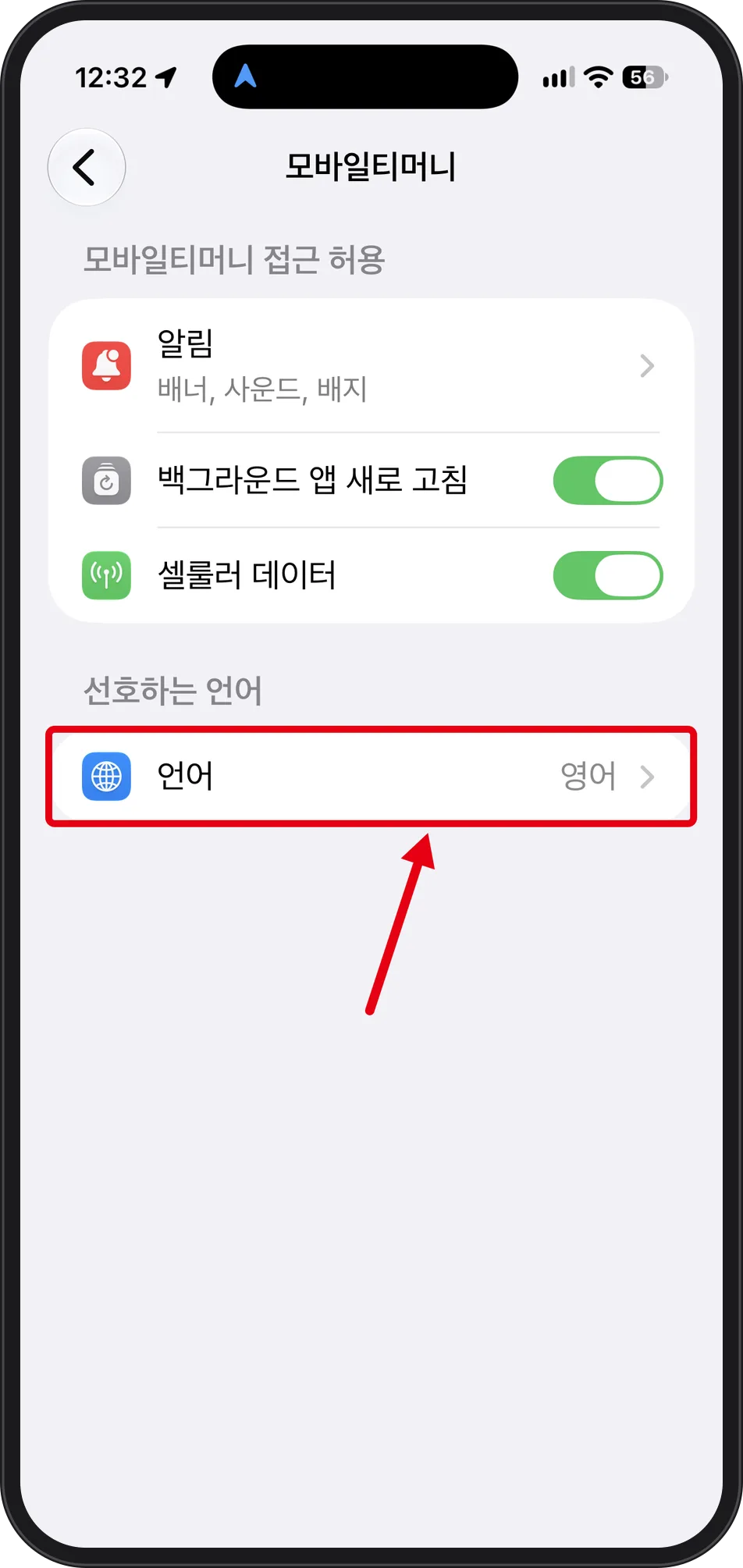 Source: Mobile Tmoney app settings on one iPhone (captured Oct 8, 2026)
On this one iPhone, Settings → 모바일티머니 (Mobile Tmoney) → 선호하는 언어 (Preferred Language) → 언어 (Language) was set to 영어 (English).
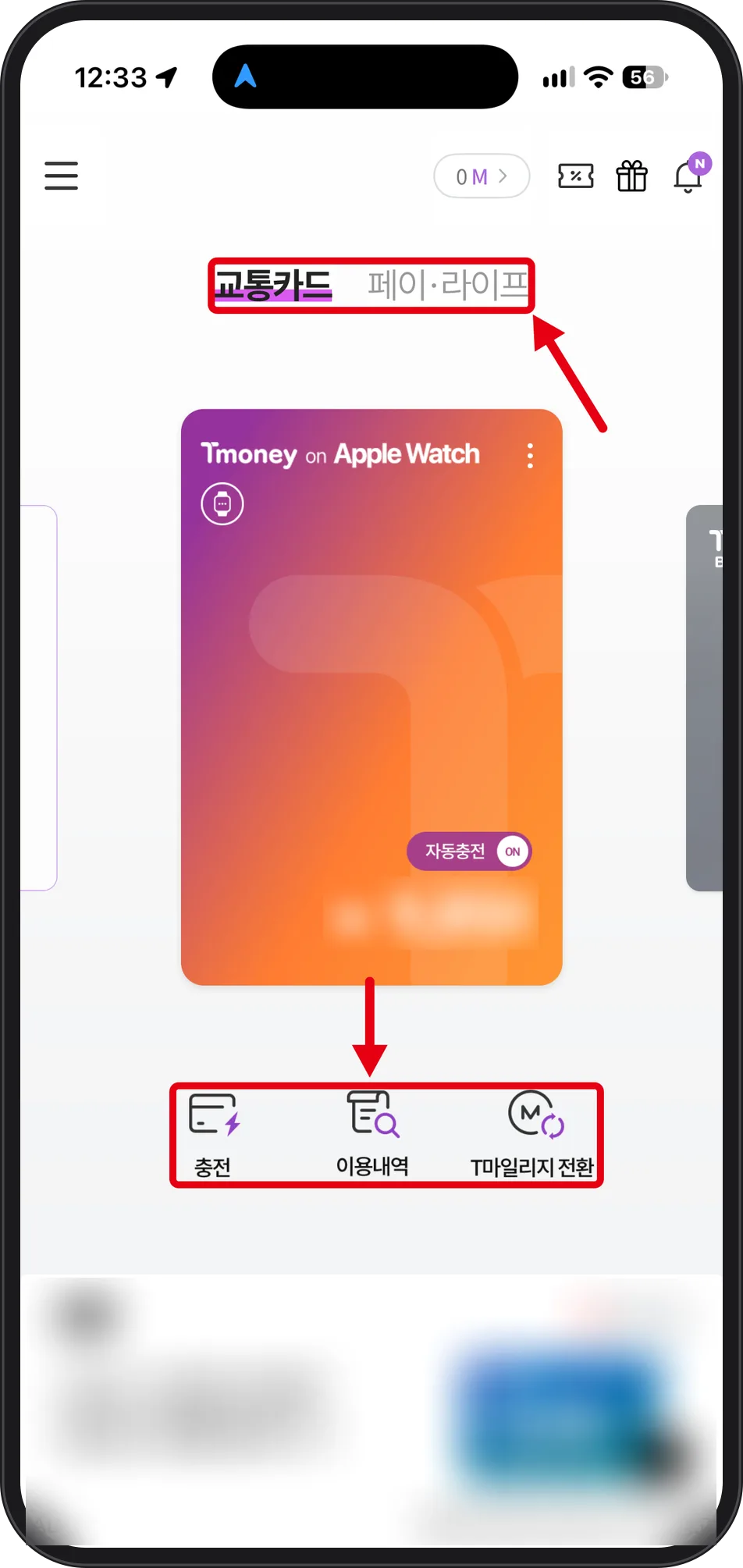 Source: Mobile Tmoney app on one iPhone (captured Oct 8, 2026)
Opening the app still showed Korean: the tabs 교통카드 (transit card) and 페이·라이프 (pay·life), the card marked 자동충전 ON (auto top-up on), and the buttons 충전 (top up), 이용내역 (usage history), T마일리지 전환 (T mileage conversion). That is one device on one date, not a claim about every phone or OS version. Because of it, the default path in this guide stays a physical card plus won cash.
Step 5. Get your balance back before the flight
 Source: Tmoney official website, User Guide (Foreigner) (captured Oct 9, 2026)
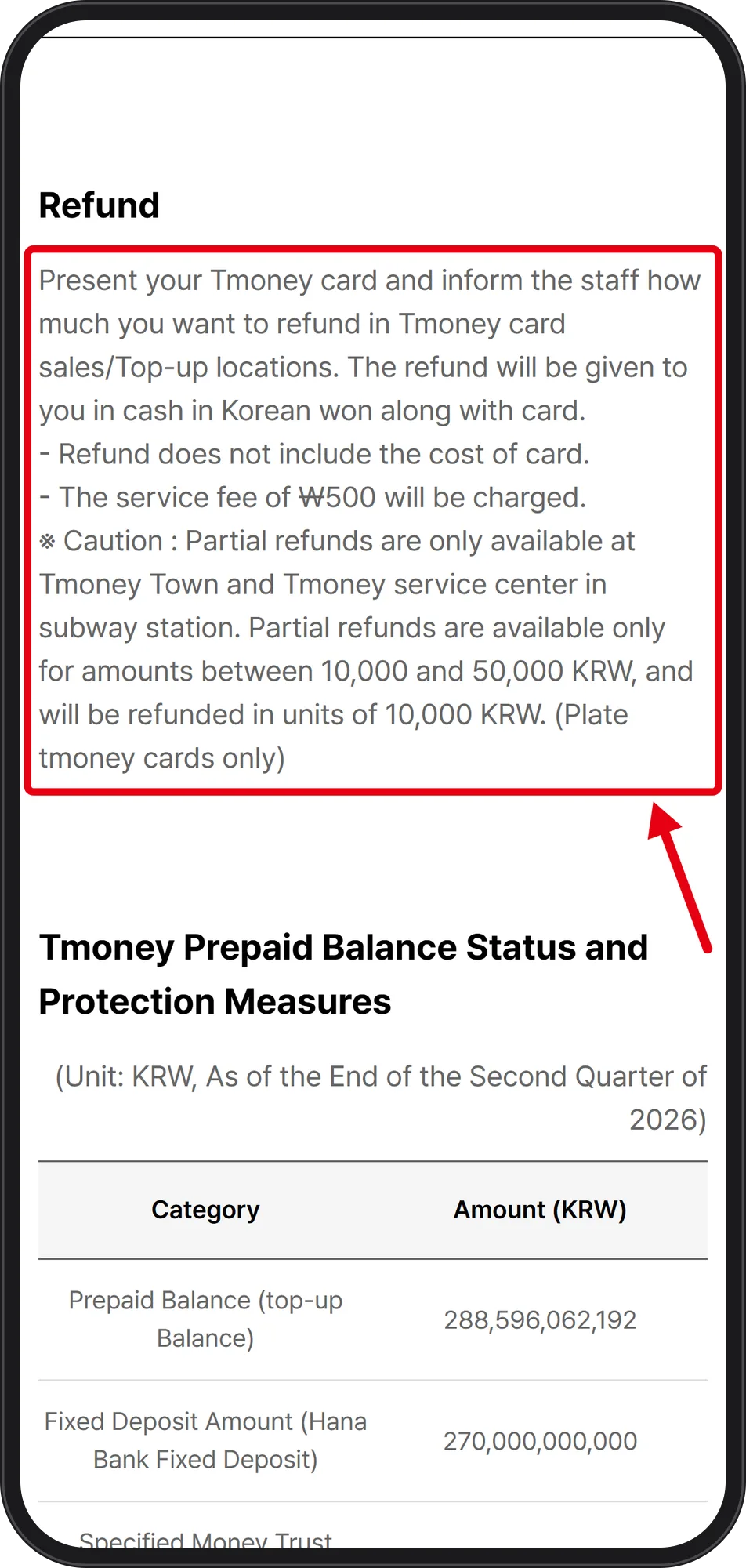
The boxed text says to present your Tmoney card at a Tmoney sales/top-up location and tell the staff how much you want refunded; the refund is given in Korean won cash along with the card. Two conditions follow: "Refund does not include the cost of card," and "The service fee of ₩500 will be charged."
Partial refunds are available only at Tmoney Town and the Tmoney service center in a subway station, between ₩10,000 and ₩50,000, in ₩10,000 units, for Plate tmoney cards only. If only a small balance is left, the ₩500 fee may eat most of it — keeping the card for a future trip can be the simpler choice.
What these screens don't answer — and who to call
These pages do not show the price of the card itself, or subway and bus base fares. The on-screen button order and wording of station top-up machines were not captured either — the official pages confirm the machines exist, and nothing beyond that is claimed here. Whether overseas-issued or credit cards can be used for top-up is not stated, and the app's own top-up flow was not tested.
For questions in a foreign language, the official guide lists the Dasan Call Center (Seoul): call 120, then press 9.
Back to the series: Korea Travel Essentials: 5 Things to Set Up Before You Arrive


